

The Solopreneur's Guide to System Prompts: How to Turn ChatGPT Into Your Dedicated Business Assistant
What Every Solopreneur Needs to Know About System Prompts
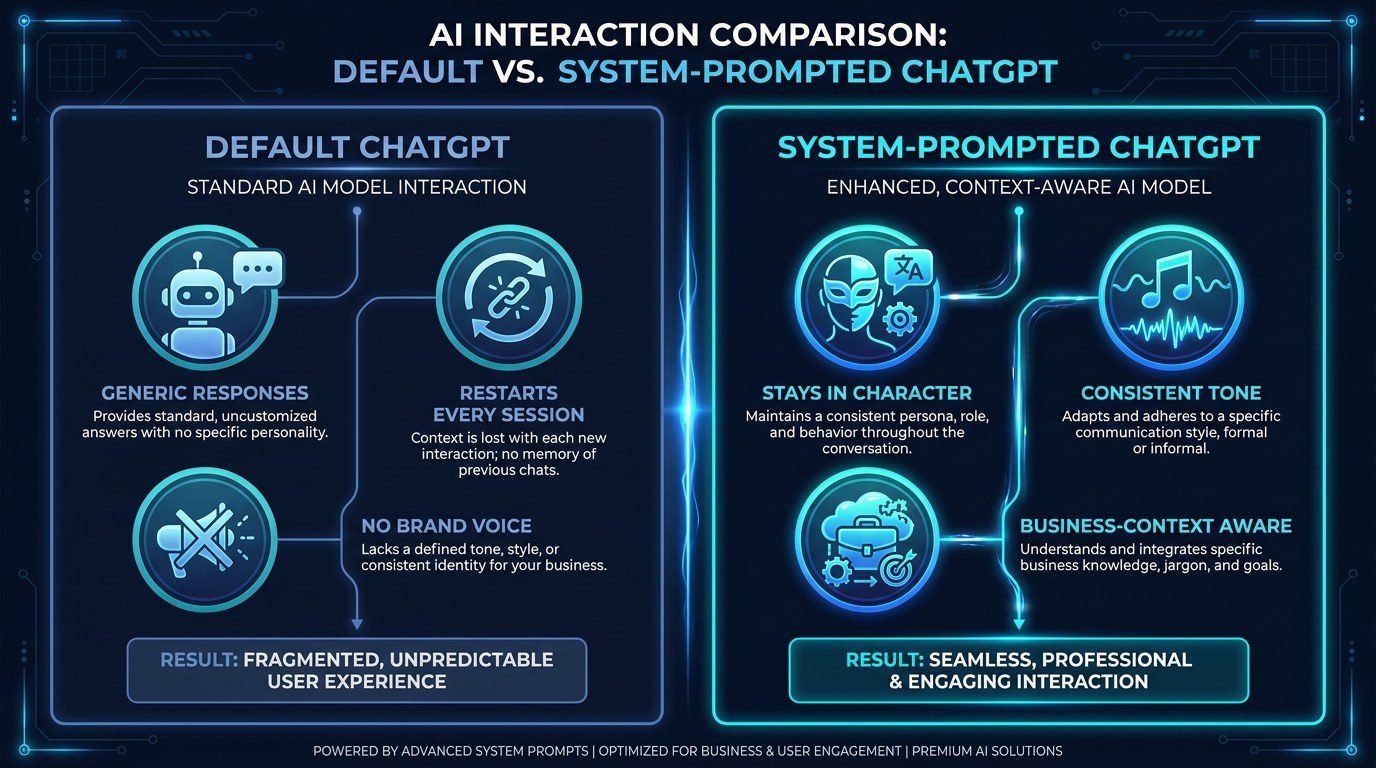
Every time you open a fresh ChatGPT window, you start over - new context, no memory of your brand, no awareness of your goals. A system prompt fixes that. It's a set of instructions that loads before the conversation begins, turning a generic AI into a context-aware assistant that already knows who you are and what you need.
Here's what this guide covers:
- What a system prompt actually is and how it works
- The five core components every strong system prompt includes
- How to write one for your specific business type
- The difference between custom instructions, system prompts, and GPT personas
- Proven templates you can copy and adapt today
- How to test, refine, and deploy your prompt across your workflow
Before you can write a good system prompt, you need to understand what makes one work - and what makes most of them fail.
AI Productivity Daily, a resource for solopreneurs and small business owners using AI to save time and grow, has tested dozens of system prompt frameworks across different business types. In this guide, I'll show you exactly what separates a vague, forgettable system prompt from one that makes ChatGPT feel like it was built for your business specifically.

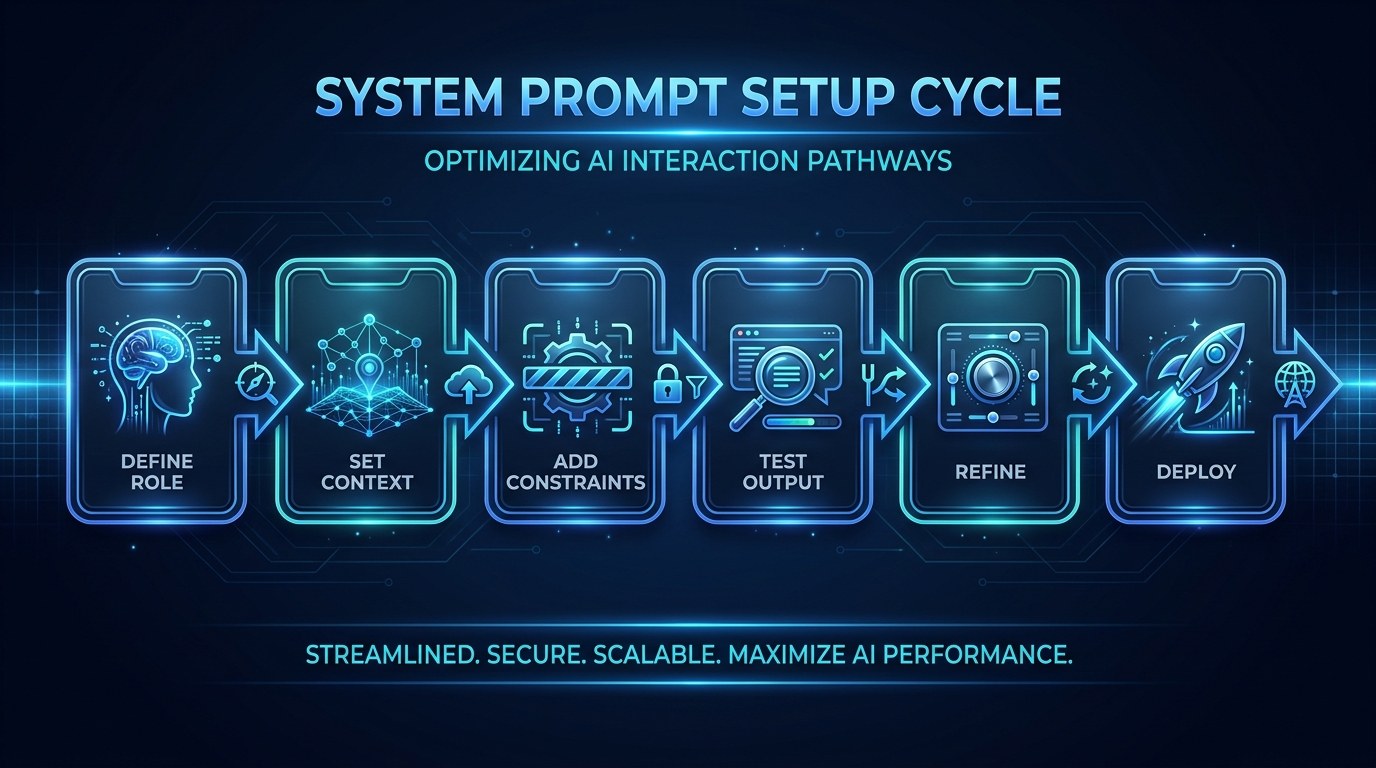
The Core Elements of a High-Performance System Prompt
Most solopreneurs who try system prompts write something like: "You are a helpful business assistant. Be professional." That's not a system prompt - it's a vague request with no structure. In 2026, with AI tools getting better at following complex multi-part instructions, leaving that kind of blank check on the table is a costly mistake.
A study from Anthropic's alignment research team found that models follow detailed, structured system instructions significantly more consistently than open-ended personality cues. The more specific you are about role, context, constraints, and output format, the more useful the AI becomes.
What the Role Layer Actually Does
The role layer is more than just "you are a marketing assistant." It defines the persona's expertise, its communication style, and the mental model it should bring to every response.
A strong role definition includes:
- Specific domain expertise: "You are an expert in service-based business marketing with 15 years of experience helping solo consultants position themselves as premium providers."
- Tone and communication style: "You write clearly, confidently, and without jargon. You never use corporate filler phrases like 'synergy' or 'leverage.'"
- Decision-making lens: "When I ask for help, prioritize time-to-impact over comprehensiveness. I'd rather have an 80% solution in 2 minutes than a perfect one in 20."
The role layer sets the mental model ChatGPT will use when interpreting every question you ask. Get this right and the rest of the prompt becomes much easier.
The one thing most solopreneurs skip is the decision-making lens - the instruction that tells the AI how to weigh tradeoffs on your behalf. Without it, you'll keep getting exhaustive lists of options when you just needed a recommendation.
What the Context Layer Changes
The context layer is where you hand over the facts about your business that ChatGPT would otherwise need to ask about every single session. This is the highest-leverage line for time savings.
Your context layer should include: your business name and type, your target customer (be specific - "coaches charging $3,000+ who want to scale without hiring"), your primary offer, your brand voice keywords, what you don't do, and any platforms or tools you work with regularly.
Once this layer is in place, you stop spending the first three messages of every conversation re-explaining your situation. The assistant already knows.
How to Choose the Right System Prompt Approach for Your Business
Not every solopreneur needs the same type of system prompt. The format you choose depends on how you primarily use ChatGPT and what problems you're trying to solve.
| Approach | Key Quality | Strengths | Best For | |---|---|---|---| | Single All-Purpose Prompt | Comprehensive | One setup, consistent across all use cases | Freelancers who use AI for varied tasks daily | | Role-Specific Prompts | Targeted | Highly optimized for specific output types | Coaches, consultants with clear workflow stages | | GPT Custom Persona | Sharable | Can be distributed to team or clients | Agency owners, productized service providers | | Dynamic Prompt + Variables | Flexible | Adaptable without rewriting the whole prompt | E-commerce owners, high-volume content creators |
The single biggest leverage point for most solopreneurs is the all-purpose prompt. Before building out multiple specialized prompts, get one central system prompt working well - it will teach you what to build next.
Avoiding the Blank-Slate Problem - Practical Tips
The blank-slate problem is what happens when you open ChatGPT without a system prompt and spend 20 minutes explaining your situation before getting to the actual question. Here's how to stop it for good:
- Write your system prompt in a Google Doc or Notion page you can access in under 10 seconds.
- Use ChatGPT's Custom Instructions feature (Settings → Personalization → Custom Instructions) for your always-on base layer.
- Create a dedicated GPT for any workflow you do more than 3 times per week - the system prompt saves automatically.
- Set a calendar reminder every 90 days to update your prompt as your business evolves.
For a starter library of prompt templates you can copy, visit aiproductivitydaily.com/free-tools.
System Prompts vs. Custom Instructions vs. GPTs - Understanding the Difference
All three are tools for giving ChatGPT persistent context - but they work differently and serve different purposes.
Custom Instructions (available to all ChatGPT users) apply globally to every conversation. They're best for your baseline role, voice, and business context - the stuff that never changes. System prompts inside custom GPTs apply only to that specific GPT and can be much longer and more detailed. They're best for specialized workflows like proposal writing, client onboarding emails, or content creation. A prompt you paste at the start of a new conversation is the most flexible but least efficient - use it for one-off experiments before promoting a tested prompt into a GPT or Custom Instruction.
System Prompts for Every Stage of Your Business
The system prompt that works for a solopreneur at $0 is not the same one that works at $10k/month. Your prompt should evolve with your business.
- Just starting out: Your system prompt focuses on helping you sound credible and professional before you have case studies. It emphasizes clarity, confidence, and positioning.
- First clients / early traction: Your prompt shifts toward execution speed - faster proposals, consistent client communication, repeatable content production.
- Scaling to consistent revenue: Your prompt becomes an operations layer - it knows your offers, your pricing, your team structure, and can help you build SOPs, delegate tasks, and make decisions faster.
Beginner vs. Advanced Options
The right level of complexity depends on where you are:
- Beginner (just getting started with ChatGPT): Start with a 3-paragraph system prompt - role, context, tone. Test it for two weeks before adding more. Use Custom Instructions so it applies automatically.
- Intermediate (using ChatGPT regularly for client work): Add constraint layers - things ChatGPT should never say, formats to avoid, specific phrasing you want it to use or not use. Create 1-2 specialized GPTs for your highest-frequency tasks.
- Advanced (running AI-assisted workflows): Chain prompts together across a multi-step process (research → outline → draft → edit). Add variable fields you fill in at the start of each session to customize the output without rewriting the whole prompt.
Customization and Workflow Integration
In 2026, the most productive solopreneurs aren't just writing better prompts - they're building prompt ecosystems. A prompt ecosystem is a set of prompts that work together across a workflow, each one picking up where the previous one left off.
Three ways to customize your prompt system for your specific workflow:
- Add a "current focus" block: Start every session by filling in one variable - today's client, today's project, today's goal - so the AI can contextualize everything through that lens without you repeating yourself.
- Hardcode your recurring deliverables: If you write weekly newsletters, monthly reports, or quarterly proposals, write a dedicated GPT for each one with the format, word count, and tone already locked in.
- Build a feedback loop: After every session, note what the AI got wrong and update your prompt. Most solopreneurs treat their first system prompt as their final one - the best ones iterate.
Why This Matters for Solopreneurs Running Lean in 2026
There's a version of AI adoption where you use ChatGPT the same way you used Google - fire a question, get an answer, start over next time. That version saves you maybe 20 minutes a week. Then there's the version where ChatGPT already knows your business before you type your first word. That version saves you hours.
For solopreneurs in 2026 who are competing against agencies with teams and budgets, a well-engineered system prompt is one of the few asymmetric advantages available. It doesn't cost more per month. It just requires one intentional hour of setup.
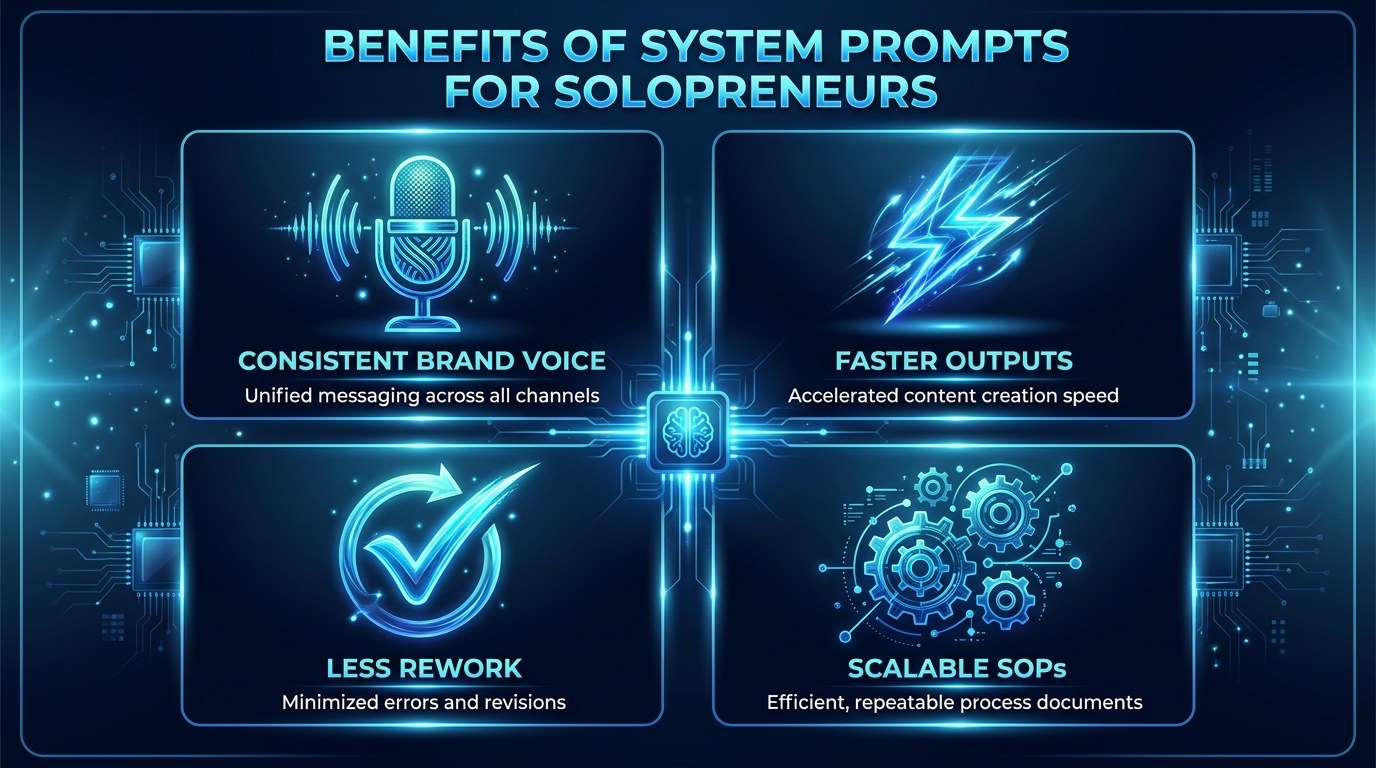
- Consistent brand voice: Every output sounds like you wrote it - no more editing generic AI content to match your tone.
- Faster outputs: Removing the context-setting phase from every session cuts average task time by 30-50%.
- Less rework: When ChatGPT understands your constraints upfront, it stops suggesting things you'll never use.
- Scalable SOPs: Once your system prompt is working, you can hand it to a VA, an assistant, or a future hire and they can produce on-brand work from day one.
Getting the Most Out of System Prompts
- Start with the "context dump": Before writing your prompt, spend 10 minutes writing a stream-of-consciousness paragraph about your business as if you were explaining it to a new contractor. That draft becomes the raw material for your context layer.
- Test with adversarial questions: After writing your prompt, ask ChatGPT the kinds of questions it tends to get wrong for your business. If it fails, update the constraint layer, not the whole prompt.
- Use the "chain of thought" trigger: End your prompt with "Before answering, briefly state your understanding of what I'm asking and the constraints you'll apply." This one line eliminates the most common failure mode - the AI confidently answering the wrong question.
- Version your prompts: Keep a running doc with dated versions of your system prompt. When something stops working, you want to know what changed and when.
For a deeper look at how to build AI workflows that compound over time, see The AI Workflow That Runs My Business While I Sleep.
Frequently Asked Questions About System Prompts
What's the ideal length for a system prompt?
For most solopreneurs, 300-600 words is the sweet spot - long enough to provide real context, short enough that the model can hold it reliably. Models like GPT-4o and Claude Sonnet can handle much longer prompts, but longer doesn't mean better. If your prompt is over 800 words, audit it for redundancy before adding more.
How often should I update my system prompt?
Review your system prompt every 60-90 days, or any time your offer, positioning, or target audience changes meaningfully. The clearest signal that your prompt needs updating is when you start manually correcting AI outputs in ways that feel repetitive - that's your prompt failing, not the model.
Can I use the same system prompt across ChatGPT, Claude, and Gemini?
You can, with minor adjustments. The structure and context layers transfer well across models. You may need to tweak tone and constraint language because different models interpret directive phrasing differently. Claude, for example, tends to respond better to explicit examples than to abstract style descriptions. Test your prompt in each environment before treating it as finalized.
Conclusion
A good system prompt is not a magic shortcut - it's a 1-2 hour investment that pays back every single session afterward. The solopreneurs who have made AI a genuine competitive advantage aren't using better models or more expensive tools. They've just taken the time to tell their tools who they are, what they need, and how they think.
Start with your context layer. Write down everything ChatGPT should know about your business before you ask your first question. That single step will transform your next AI session more than any new feature or model update.
When you're ready for the next level, start with the free AI Morning Brief at aiproductivitydaily.com/free-tools - a daily digest of what's moving in AI, filtered for solopreneurs.
One AI workflow, every weekday.
Tutorials, tool reviews, and automation playbooks for solopreneurs running on AI. Short, useful, and free. Unsubscribe anytime.
No pitch. No upsell. One quick AI workflow per weekday.