
The Solopreneur's Guide to AI Meeting Automation: Turn Every Call Into Notes, Tasks, and Follow-Ups in 2026
What Every Solopreneur Needs to Know About AI Meeting Automation
You wrap a client call fired up with three commitments — and by the time you have poured a coffee, one of them has already slipped your mind. When you run the whole business yourself, the meeting is not the work. What happens after the meeting is the work: the notes, the follow-up email, the task you swore you would remember. AI meeting automation closes that gap by turning a recorded conversation into a clean summary, a list of action items, and a follow-up draft that lands exactly where you will see it.
Here is what this guide covers:
- AI notetakers that auto-join calls
- Transcription and speaker labeling
- Summaries and action-item extraction
- Task and CRM syncing
- Follow-up email drafting
- Searchable meeting history
And the core things to weigh before you automate:
- Which platforms you actually meet on
- Recording consent and privacy
- How accurate the transcript needs to be
- Where your notes and tasks already live
- Free versus paid usage limits
- How much you trust AI to draft in your voice
By the end, you will know which pieces to automate first and which setup fits the way you already work.
AI Productivity Daily, a resource for solopreneurs and small business owners using AI to save time and grow, has tested the current wave of AI notetakers and meeting workflows. In this breakdown, I will show you how to build a nearly hands-off system that captures every call and turns it into next steps — without adding one more app you have to babysit.
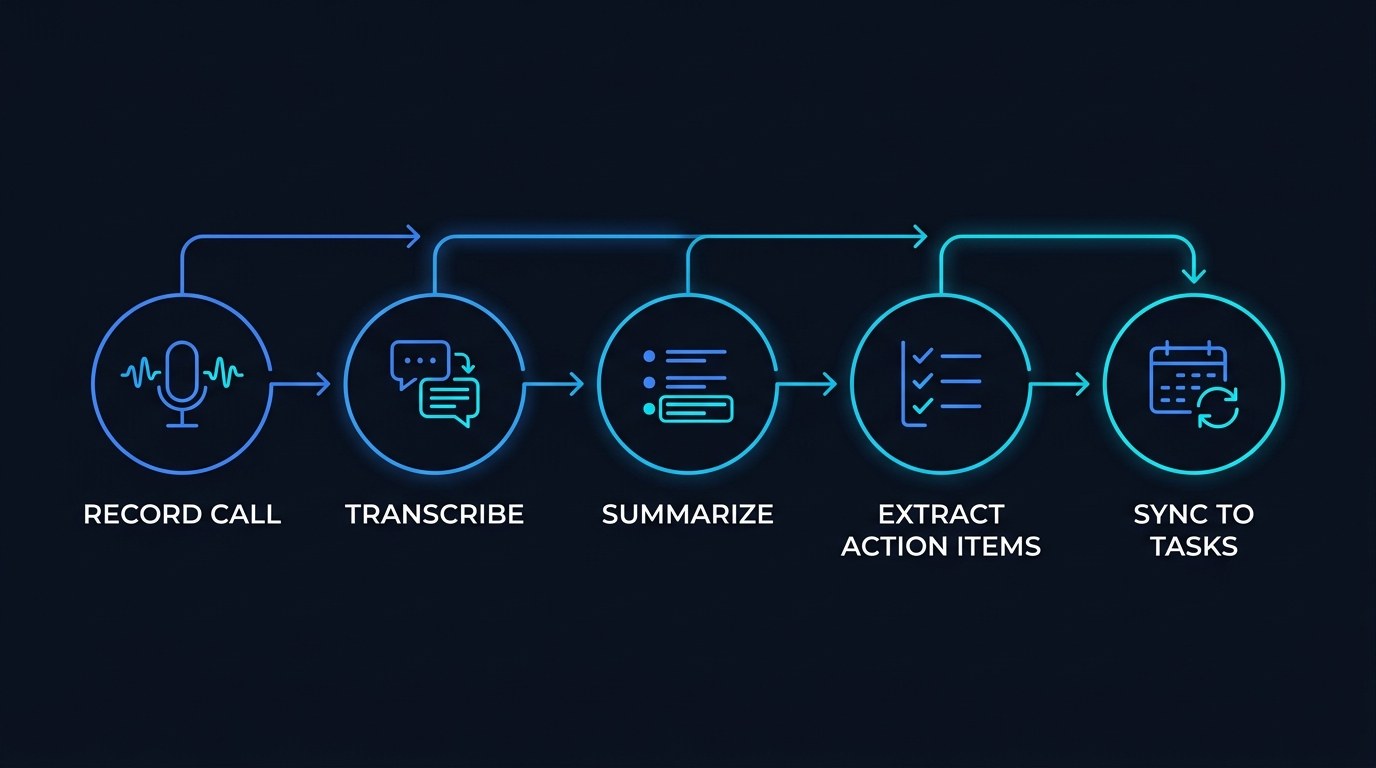
Here is the whole system at a glance before we go deeper:
| Stage | What the AI does | What you walk away with | |---|---|---| | Capture | Auto-joins and records the call | A clean audio or video record | | Transcribe | Turns speech into labeled text | A searchable transcript | | Summarize | Condenses the conversation | A recap you can skim in 30 seconds | | Extract | Pulls out decisions and to-dos | A ready-made action-item list | | Route | Sends items to your tools | Tasks and follow-ups already in place |
The Core Capabilities of AI Meeting Automation
Meetings quietly eat a solopreneur's week. Studies have long estimated that professionals lose the equivalent of a full workday every week to meetings and the admin that trails behind them — the retyping, the "wait, what did we agree on," the follow-up that goes out two days late. Heading into 2026, that tax is optional. Nearly every major video platform now ships some form of AI recap, and a healthy market of dedicated notetakers has grown up around the rest. The job is no longer whether to automate meetings, but which layer to hand off first.
The system breaks into two halves: capturing what was said, and turning it into what happens next. Get the first half reliable and the second half almost takes care of itself.
Capture and Transcription
The foundation is a recording and a transcript. An AI notetaker either joins your call as a participant or runs quietly in the background, then converts the audio into text with each speaker labeled. Accuracy in 2026 is good enough that lightly technical calls come back clean, though niche jargon and heavy accents still need a human eye.
When you evaluate the capture layer, look for:
- Auto-join so you never forget to hit record
- Speaker labels so the transcript reads like a script, not a wall of text
- Platform coverage for the tools you actually use (Zoom, Meet, Teams, phone)
- Storage and search so a call from three months ago is still findable
Get this layer right and you have already solved the worst part of meeting admin: having a trustworthy record you did not have to type.
Summaries and Action-Item Extraction
Raw transcripts are useful but nobody rereads a 40-minute wall of text. The real value is the layer on top: a short summary and a list of action items with owners and, where possible, due dates. This is where large language models shine, because "read this conversation and tell me what I agreed to do" is exactly the kind of task they are built for.
A notable shift in 2026 is that extraction has moved from generic to structured. Instead of a vague paragraph, good tools now return a decisions list, an action-items list, and open questions — the three things a solopreneur actually needs to move a project forward. The practical payoff is huge: you leave a call with your next steps already written, so the work starts instead of the remembering.
How to Choose the Right Meeting Automation for Your Business
There is no single best tool — there is the one that matches where your calls happen and where your work already lives. Use the table below to find your starting point.
| Option | Key Quality | Strengths | Best For | |---|---|---|---| | Dedicated AI notetaker | Auto-joins every call | Speaker labels, action items, searchable library | Client-facing solopreneurs with lots of calls | | Built-in platform recap | Native to Zoom, Meet, or Teams | Zero setup, no third-party bot | People who meet mostly on one platform | | Automation-platform workflow | Fully customizable | Routes notes anywhere via Zapier or Make | Tinkerers who want notes in their own tools | | Workspace AI (paste transcript) | Lives with your docs | Summarize inside Notion, Claude, or Docs | Async teams and recorded-not-live calls | | Manual plus AI assistant | Total control | No bot in the room, pick what to process | Privacy-sensitive or sensitive-topic calls |
If you take one thing away, start with a dedicated AI notetaker that supports action-item extraction. For a solopreneur, the single biggest win is not the transcript — it is walking out of every call with your to-dos already written. That one feature saves more time per week than any other, because it removes the step where things quietly fall through the cracks.
"Which One Won't Waste My Whole Afternoon?" — Practical Tips
Before you commit, run this quick gut check so setup takes minutes, not a lost afternoon:
- Connect the tool to the one platform you use for 80 percent of calls first — do not try to cover every edge case on day one.
- Run it on 3 low-stakes internal calls before you let it into a client meeting, so you learn its quirks with nothing on the line.
- Turn on action-item extraction and email summaries immediately; leave fancier CRM automations for week two.
- Set a 5-minute weekly review to skim summaries and correct any mislabeled owners — a tiny habit that keeps the whole system trustworthy.
If you want more quick wins like this, our roundup of the AI automations that actually save solopreneurs time pairs well with a meeting workflow. And you can grab a free running list of tools in the AI Productivity Daily free tools library.
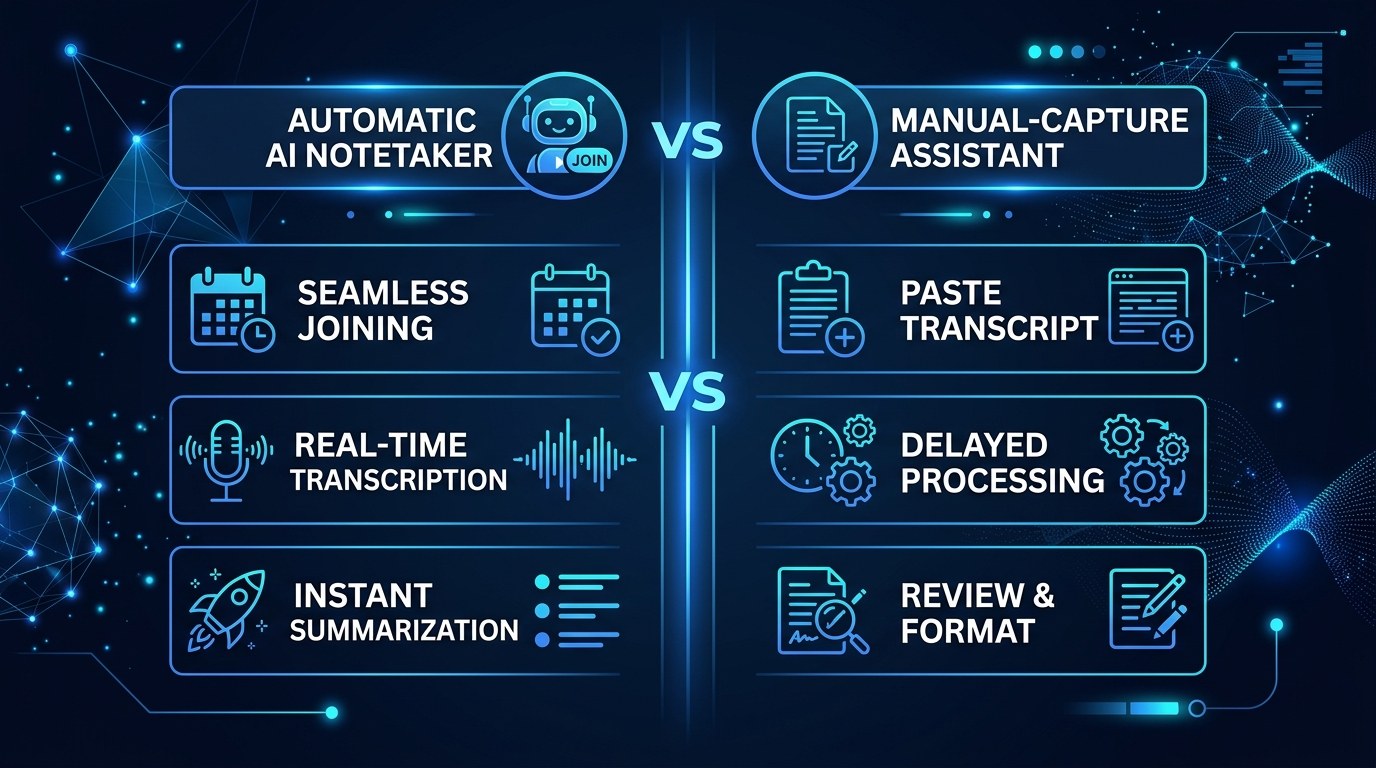
Auto-Join Notetaker vs. Paste-In Assistant — Understanding the Difference
The clearest fork in the road is whether a bot joins your call live or you feed a recording to an AI afterward. An auto-join notetaker is effortless and never forgets, but it puts a visible participant in the room — sometimes awkward on a sensitive call. A paste-in assistant keeps the meeting private and gives you total control over what gets processed, at the cost of a manual step.
The choice comes down to priorities. If your top concern is never losing a detail, the auto-join notetaker wins. If discretion and control matter more than convenience, the paste-in approach keeps you in the driver's seat.
AI Meeting Automation for Every Stage of Your Business
The right amount of automation scales with how call-heavy your week is:
- Just getting started: A handful of discovery and sales calls a week. A free notetaker or your platform's built-in recap is plenty — the win is professional follow-ups without the admin.
- Growing and booked out: Back-to-back client calls, and follow-through is now a reputation issue. A paid notetaker with CRM sync keeps every commitment visible so nothing slips.
- Running a small team or contractors: Handoffs matter. Shared, searchable meeting notes mean a contractor can catch up on a project without a status call.
Beginner vs. Advanced Options
Start with the tier that matches your call volume, then upgrade when you feel the ceiling:
- Free tier: Built-in platform recaps or a free notetaker with monthly limits. Perfect for proving the value before you spend a dollar. Right for anyone with a handful of calls a week.
- Paid tier: Unlimited recordings, better action-item extraction, and integrations to your task manager or CRM. The meaningful upgrade for booked-out solopreneurs, because the time saved dwarfs the subscription.
- Power setup: A notetaker wired through an automation platform so summaries auto-create tasks, update deals, and draft follow-ups. Justifies the extra effort once meetings are a core revenue channel and every saved minute compounds.
Customization and Workflow Integration
The 2026 advantage is that these tools no longer live on an island. A meeting workflow can now hand off to the rest of your stack automatically. Tailor it to how you work by:
- Routing action items straight into your task manager so they show up on your real to-do list
- Pushing call summaries into your CRM or client folder so context is one click away
- Auto-drafting a follow-up email you review and send, instead of writing it from scratch
Why This Matters for Solopreneurs Running Lean in 2026
If you have hesitated to put a bot in your meetings, that instinct is fair — the last thing a lean operator needs is another tool that creates more work than it removes. But meeting automation is different, because it targets the exact admin that already steals your evenings. The framework above lets you start with one platform and one feature, prove the value in a week, and only then expand.
Here is what you actually gain when you apply this to a real solopreneur workflow:
- Hours back every week as note-taking and follow-up drafting move off your plate
- Nothing forgotten because commitments become tasks the moment the call ends
- Faster, more professional follow-ups that make a one-person shop feel buttoned-up
- A searchable memory of every client conversation, so context is never lost
Getting the Most Out of AI Meeting Automation
A few insider habits separate a system you trust from one you quietly abandon:
- Standardize your ask. Save a summary prompt like "list decisions, action items with owners, and open questions" so every recap comes back in the same shape you can scan in seconds.
- Automate the routing, review the content. Let the workflow move notes and create tasks automatically, but keep a human eye on anything that goes to a client.
- Name calls clearly before they start. A titled event ("Acme — Kickoff") makes your searchable library actually searchable six months later.
- Pair it with your other agents. Meeting notes are richer fuel when they feed the rest of your stack — our guide to Claude agents for workflow automation shows how to chain them together.
Frequently Asked Questions About AI Meeting Automation
How do I start with AI meeting automation without overcomplicating it?
Pick one notetaker, connect it to the platform you use most, and turn on just two features: action-item extraction and an email summary. Run it on a few internal calls first. You can add CRM sync and auto-tasks later — the goal in week one is simply to stop typing notes.
What actually happens on a call once it is automated?
The flow is consistent across tools:
- The notetaker joins or records the call automatically
- It transcribes the audio with each speaker labeled
- An AI summary and action-item list are generated within minutes
- Those items sync to your task manager, CRM, or inbox based on your rules
You review the output, fix anything mislabeled, and send the follow-up — usually in under five minutes.
Do I need to tell people I am recording?
Yes, and it matters both legally and for trust. Recording-consent rules vary by state and country, so make it a habit to announce that an AI notetaker is present at the top of the call, or enable your tool's built-in consent prompt. When in doubt, ask — a five-second heads-up protects the relationship and keeps you on the right side of the law.
Conclusion
The meeting was never the hard part — remembering what to do afterward was. AI meeting automation quietly removes that burden, so every call ends with a clean summary, a written list of next steps, and a follow-up ready to send. For a solopreneur, that is not a nice-to-have gadget; it is hours back and a reputation for following through, both earned while you do nothing but show up and talk.
Start small and let the system prove itself. If you want a steady feed of the tools and workflows worth your time, start with the free AI Morning Brief at aiproductivitydaily.com/free-tools — a daily digest of what is moving in AI, filtered for solopreneurs.
One AI workflow, every weekday.
Tutorials, tool reviews, and automation playbooks for solopreneurs running on AI. Short, useful, and free. Unsubscribe anytime.
No pitch. No upsell. One quick AI workflow per weekday.