
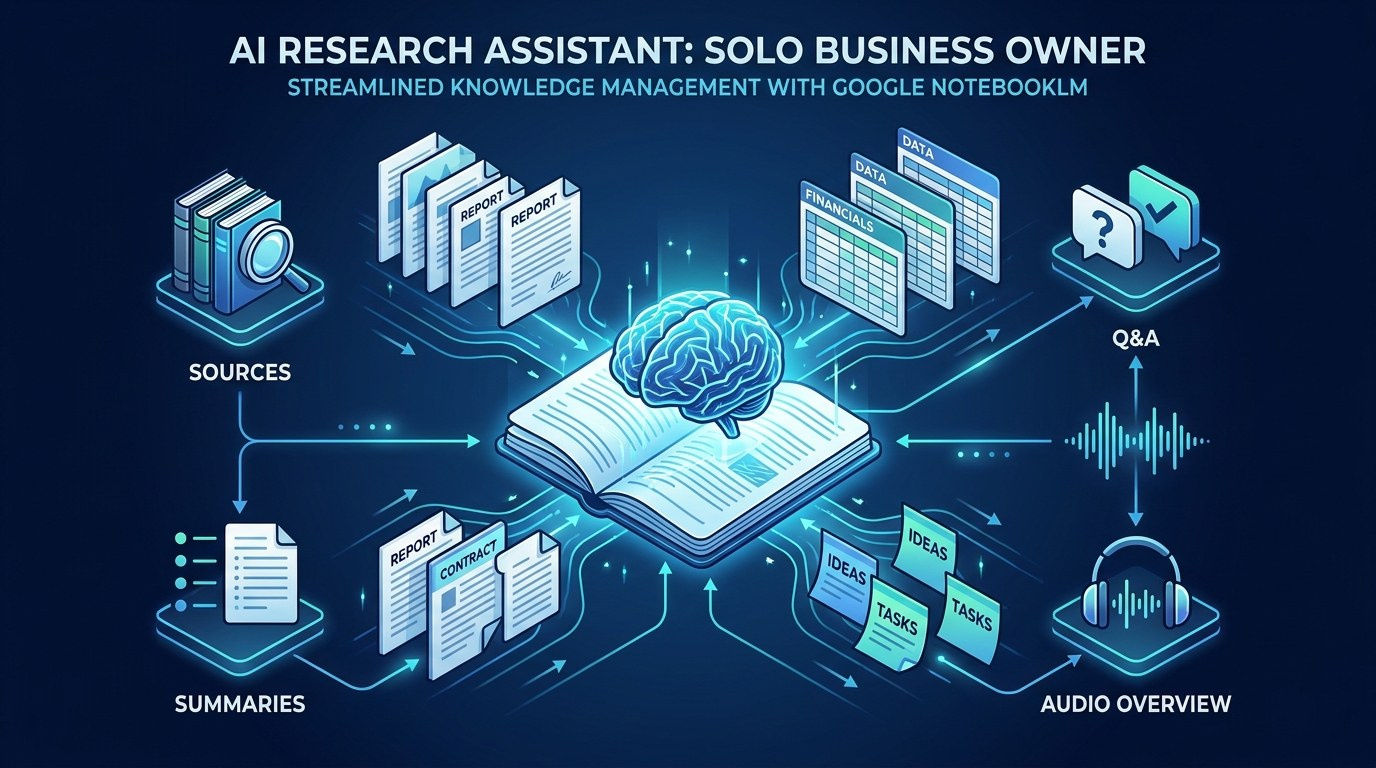
The Solopreneur's Guide to NotebookLM: Turn Your Documents Into a Research Assistant That Knows Your Business in 2026
What Every Solopreneur Needs to Know About NotebookLM
If you have ever pasted a 40-page PDF into a chatbot and gotten a confident answer that turned out to be wrong, you already understand the problem NotebookLM was built to solve. When you run a business alone, your knowledge lives scattered across contracts, client notes, past proposals, and half-finished docs, and finding the one line you need eats real hours every week.
Here is what this guide covers:
- What NotebookLM actually is
- How source-grounded AI differs
- The features worth your time
- Free vs. paid tiers
- Real solopreneur use cases
- How to get set up fast
And the core things to weigh before you commit:
- How much source material you have
- Whether you need citations you can trust
- Your comfort with Google's ecosystem
- Privacy of your business documents
- The time you currently lose to research
- Whether audio learning fits your day
By the end, you will know whether NotebookLM belongs in your stack, how it beats a general chatbot for document work, and exactly how to set up your first notebook this week.
AI Productivity Daily, a resource for solopreneurs and small business owners using AI to save time and grow, has tracked and tested source-grounded AI tools since they hit the mainstream. In this guide, I'll break down how NotebookLM works, where it wins, and how to put it to work without adding another confusing app to your life.
The Core Capabilities of NotebookLM
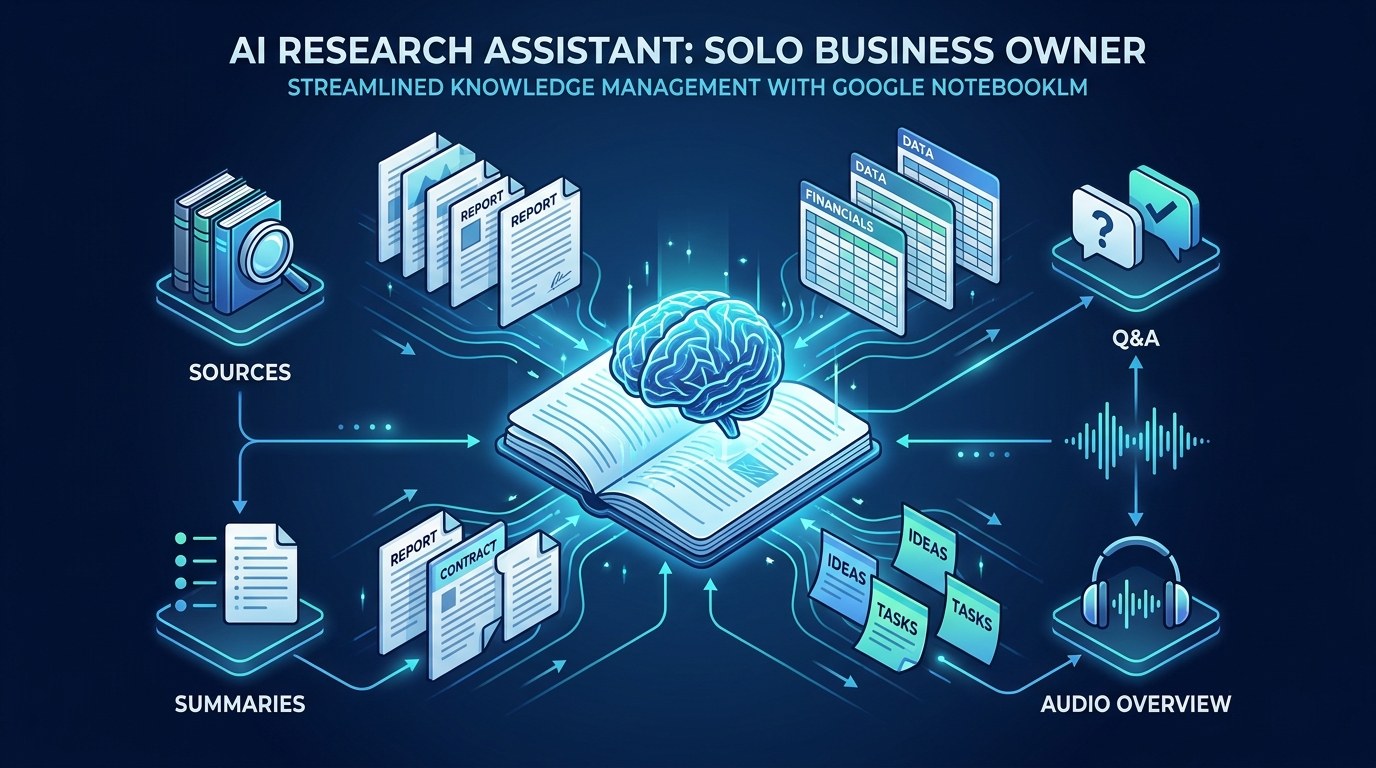
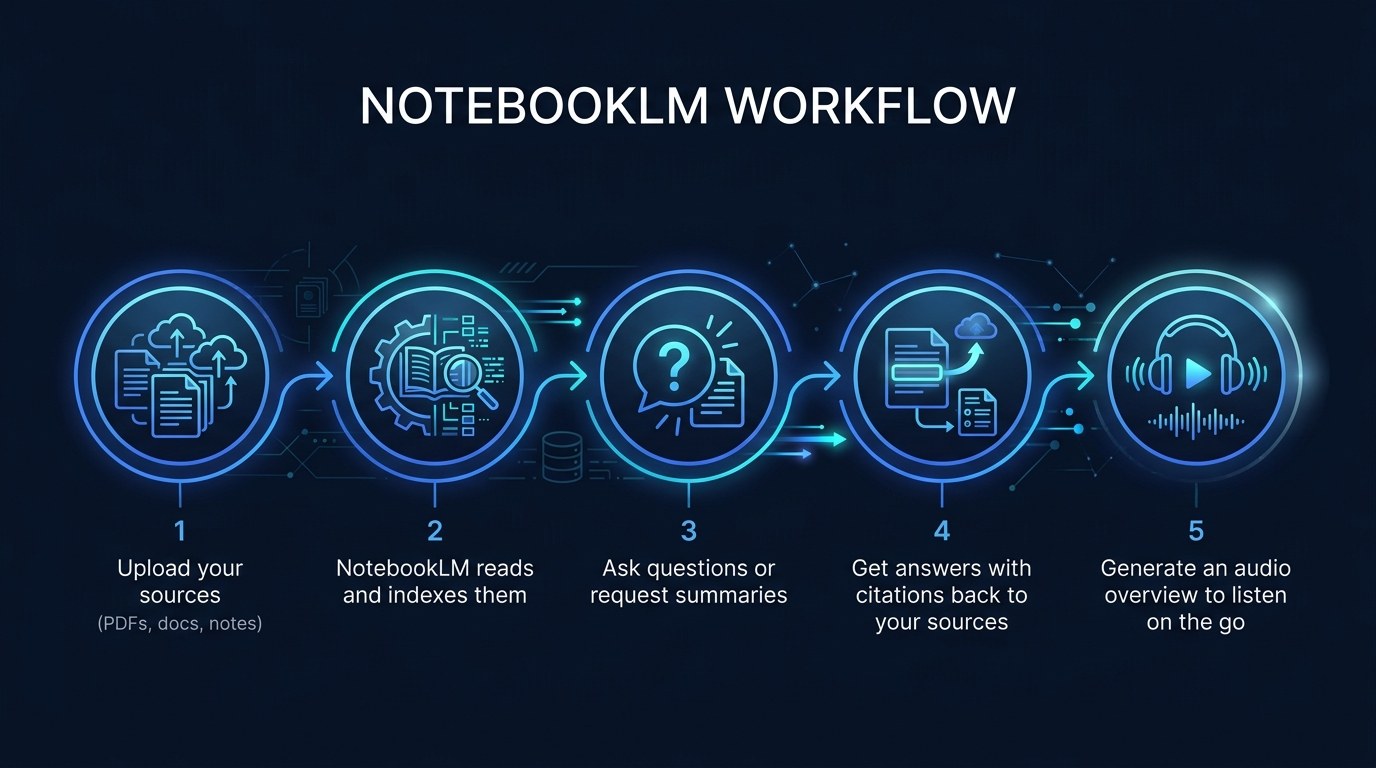
NotebookLM is Google's research and note-taking tool that grounds an AI model in documents you upload, so every answer it gives points back to your own sources instead of the open internet. You create a "notebook," add sources such as PDFs, Google Docs, pasted text, website links, or even YouTube transcripts, and then ask questions, request summaries, or generate study guides that stay anchored to that material.
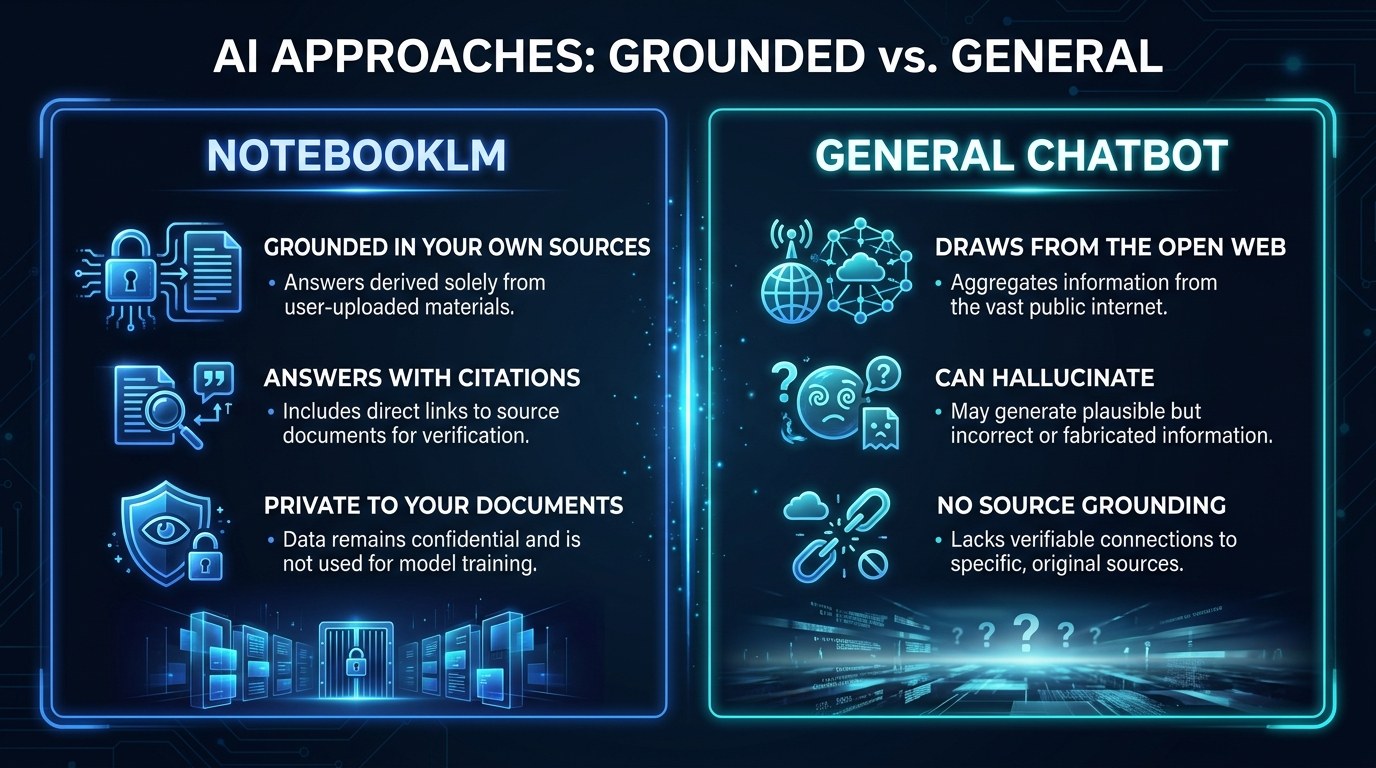
The distinction that matters for solopreneurs is grounding. A general chatbot pulls from everything it was trained on, which is powerful but makes it prone to confident guesses. NotebookLM restricts itself to what you gave it and cites the exact passage behind each claim. As of 2026, Google lets a single notebook hold up to roughly 50 sources on the free tier, with each source running as long as about 500,000 words, which is enough to load an entire year of client documentation into one place.
Here is a quick orientation before we go deeper:
| Question | Short answer | |---|---| | What is it? | An AI grounded in your own documents | | What does it cost? | Free tier plus a paid NotebookLM Plus tier | | Best use? | Research, synthesis, and Q&A over your files | | Biggest strength? | Answers with citations you can verify |
Source Grounding and Citations
Grounding is the feature that turns NotebookLM from a novelty into a tool you can actually trust with client work. When you ask a question, the answer arrives with small numbered citations. Click one and it jumps you to the exact sentence in the source that supports it.
- Verifiable answers — every claim traces back to a passage you can read yourself
- Reduced hallucination — the model stays inside your uploaded material
- Faster fact-checking — no re-reading the whole document to confirm a detail
- Cleaner handoffs — you can show a client where a summary came from
For a solopreneur, that means you can summarize a 60-page vendor contract and still defend every point you pull from it, which is the difference between using AI output and trusting it.
Audio Overviews and Study Formats
The feature that surprised most people is the Audio Overview, which turns your sources into a natural, podcast-style conversation between two AI hosts discussing your material. It sounds strange until you try it on a dense report during a commute or a walk.
A notable development through 2026 is how far these generated formats have grown beyond audio. NotebookLM now also produces briefing documents, timelines, study guides, and FAQ sheets from the same set of sources, each one a different lens on the same underlying material.
The practical benefit is flexibility. You can read a summary when you are at your desk, listen to an audio overview when you are away from it, or hand a timeline to a contractor so they get up to speed on a project without you writing the onboarding doc yourself.
How to Choose the Right Research Approach for Your Business
Not every research problem needs NotebookLM. The trick is matching the tool to the job, and the table below lays out the realistic options a solopreneur actually reaches for.
| Option | Key Quality | Strengths | Best For | |---|---|---|---| | NotebookLM | Grounded in your files | Cited answers, audio, private to your sources | Synthesizing your own documents | | General AI chatbot | Broad open knowledge | Brainstorming, drafting, wide range | Open-ended creative and writing tasks | | AI search engine | Live web results | Current events, quick facts, sourcing new info | Researching things outside your files | | Manual notes and docs | Full manual control | Zero cost, total ownership, no setup | Small, simple reference needs | | Dedicated wiki tool | Structured storage | Organized long-term knowledge base | Teams and heavy documentation |
If you only take one thing from this table, make it this: reach for NotebookLM when the answer already exists inside documents you own but is buried too deep to find fast. That is its home turf, and no general chatbot matches it there because the chatbot was never given your files in the first place.
"I don't have time to learn another tool" — Practical Tips
That hesitation is fair, so keep the on-ramp small.
- Start with a single notebook and just 3 to 5 sources, not your entire archive
- Spend your first 10 minutes only asking questions, before touching any other feature
- Generate one Audio Overview so you see the standout feature immediately
- Give yourself one week of real use before deciding whether it earns a place in your stack
If your research need is more about live web answers than your own files, a tool like Perplexity may fit better, and our Solopreneur's Guide to Perplexity AI walks through exactly when to choose it instead.
Grounded AI vs. Open AI — Understanding the Difference
The core distinction is where the answer comes from. Grounded AI, like NotebookLM, answers only from the sources you provide and cites them. Open AI, like a standard chatbot, answers from its broad training and the wider web, which is flexible but harder to verify.
Your priorities decide the choice. If accuracy and traceability matter most, such as when you are quoting a contract to a client, grounded wins. If range and creativity matter most, such as when you are drafting fresh copy from scratch, open wins.
NotebookLM for Every Stage of Your Business
The tool flexes to fit where you are, not just what you sell.
- Just starting out — load your market research, competitor pages, and early notes into one notebook and ask it to surface patterns you missed
- Actively growing — turn client discovery calls, proposals, and contracts into a searchable memory so nothing important slips through the cracks
- Scaling with help — generate briefing docs and timelines that get a contractor or VA up to speed without you writing onboarding material by hand
Beginner vs. Advanced Options
- Free tier — generous limits, core Q&A, citations, and Audio Overviews; right for nearly every solopreneur getting started
- NotebookLM Plus — higher source and notebook limits, more Audio Overviews, and customization controls; worth it once notebooks become part of your daily workflow
- Workspace and team access — bundled through Google's business plans; justified when you want shared notebooks and admin controls across a small team
Customization and Workflow Integration
A trend worth noting in 2026 is how much control you now have over the AI's behavior inside a notebook, from steering the tone of answers to customizing the focus of an Audio Overview.
- Set a notebook's focus so answers emphasize the angle you care about
- Mix source types, combining PDFs, Docs, and web links in one place
- Direct Audio Overviews toward a specific topic instead of a broad summary
Why This Matters for Solopreneurs Running Lean in 2026
You already wear every hat, so the last thing you need is a tool that adds work. The honest hesitation with any new AI app is that setup will cost more time than it saves. NotebookLM earns its place precisely because the practical framework is small: point it at documents you already have and start asking questions.
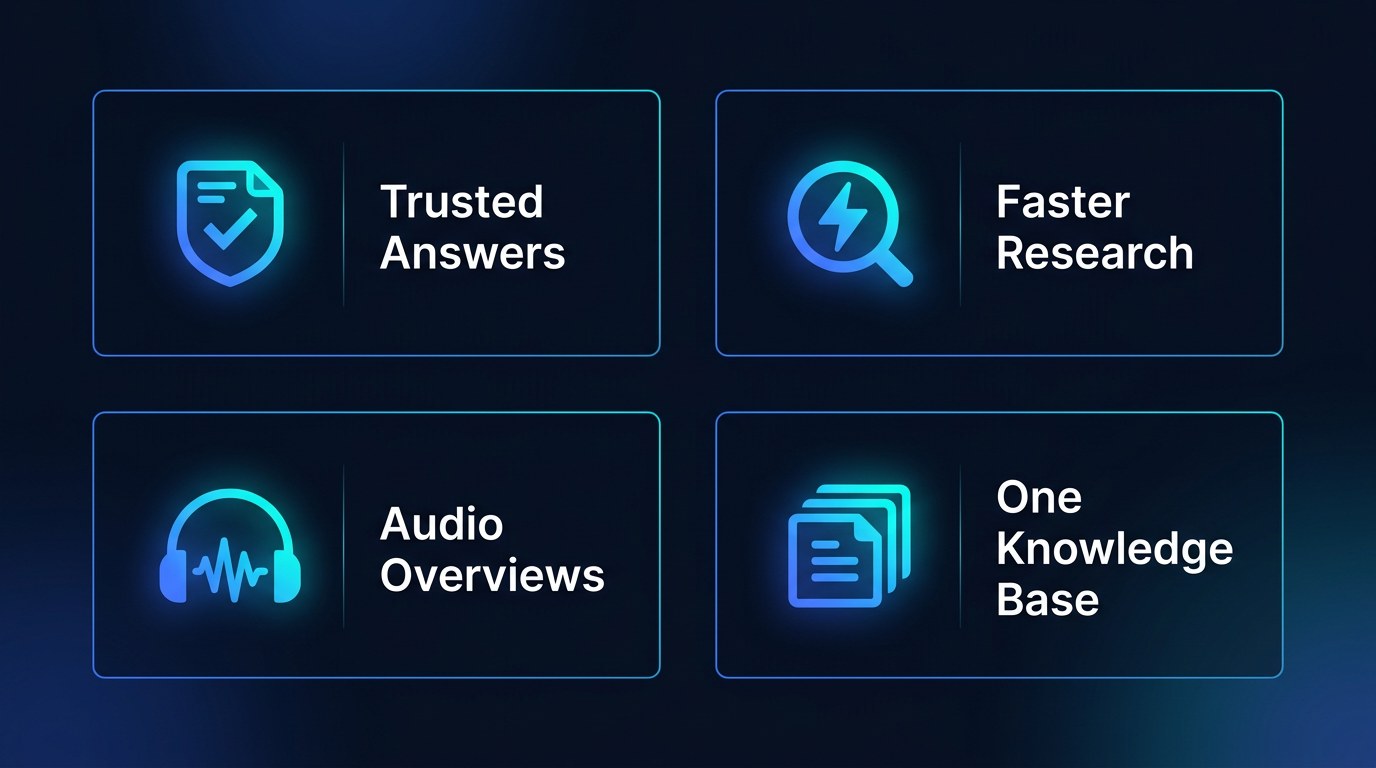
- Trust you can defend — cited answers you can verify before you send them to a client
- Hours reclaimed — no more re-reading long files to find one detail
- A second format for free — audio overviews turn dead commute time into catch-up time
- One place for scattered knowledge — your business memory stops living in twelve folders
Getting the Most Out of NotebookLM
- Curate ruthlessly — fewer, higher-quality sources give sharper answers than a dumped archive
- Ask specific questions, since "summarize section 3's payment terms" beats "tell me about this"
- Keep separate notebooks per client or project so answers never bleed across contexts
- Re-generate an Audio Overview after adding new sources so it reflects your latest material
If you want a companion tool for drafting and building on top of what you research, pair NotebookLM with a flexible assistant like the one in our Solopreneur's Guide to Claude AI.
Frequently Asked Questions About NotebookLM
How do I actually get started with NotebookLM?
Go to the NotebookLM site, sign in with your Google account, and create a new notebook. Add three to five sources you already have, then ask a plain-language question about them. You can be useful inside of ten minutes without touching any advanced feature.
What happens to my documents once I upload them?
- Your sources sit inside your own notebooks, tied to your Google account
- The AI's answers are grounded only in the sources you add to that notebook
- Review Google's current privacy terms before uploading sensitive client material
- Keep truly confidential documents out of any cloud tool unless the terms clearly permit it
Can I use NotebookLM for client work, or just personal research?
You can absolutely use it for client work, and the citations are what make that safe. Because every answer points back to a source passage, you can verify a summary before it leaves your desk. The one caveat is confidentiality: confirm you have the right to upload a given client's documents before you do.
Conclusion
Running a business alone does not mean carrying every detail in your head. The real promise of NotebookLM is quieter than most AI hype: it takes the knowledge you already own and makes it answerable, so the hours you used to lose digging through files turn into minutes spent asking a question. That is not a flashy upgrade, but it is the kind that compounds week after week.
Start small this week. And if you want a daily edge, begin with the free AI Morning Brief at aiproductivitydaily.com/free-tools — a daily digest of what's moving in AI, filtered for solopreneurs.
One AI workflow, every weekday.
Tutorials, tool reviews, and automation playbooks for solopreneurs running on AI. Short, useful, and free. Unsubscribe anytime.
No pitch. No upsell. One quick AI workflow per weekday.