

The Solopreneur's Guide to Chain-of-Thought Prompting: Get AI to Reason Step by Step for Better Answers in 2026
What Every Solopreneur Needs to Know About Chain-of-Thought Prompting
You ask AI a question that involves a few moving parts — pricing math, a scheduling conflict, which lead to chase first — and it fires back a confident answer that's just wrong. The problem usually isn't the model. It's that you asked it to leap straight to the answer instead of walking through the steps. Chain-of-thought prompting fixes that by telling the AI to reason out loud before it commits.
Here's what this guide covers:
- What chain-of-thought actually is
- When it helps and when it doesn't
- Zero-shot vs. worked-example styles
- Ready-to-paste prompt patterns
- A decision framework for your tasks
- Common mistakes that waste tokens
And the core trade-offs you'll weigh as you use it:
- Accuracy vs. speed and cost
- Short answers vs. transparent reasoning
- When to show the work vs. hide it
- How much structure to give the model
- Which tasks are worth the extra steps
- How to verify the reasoning is sound
By the end, you'll know exactly when to ask AI to "think step by step," how to phrase it, and how to spot when the reasoning — not just the answer — is off.
AI Productivity Daily, a resource for solopreneurs and small business owners using AI to save time and grow, has tested chain-of-thought prompting across dozens of real business tasks. In this guide, I'll show you the exact phrasing that works, the tasks where it earns its keep, and the traps that quietly burn your time and budget.

The Core Concepts of Chain-of-Thought Prompting
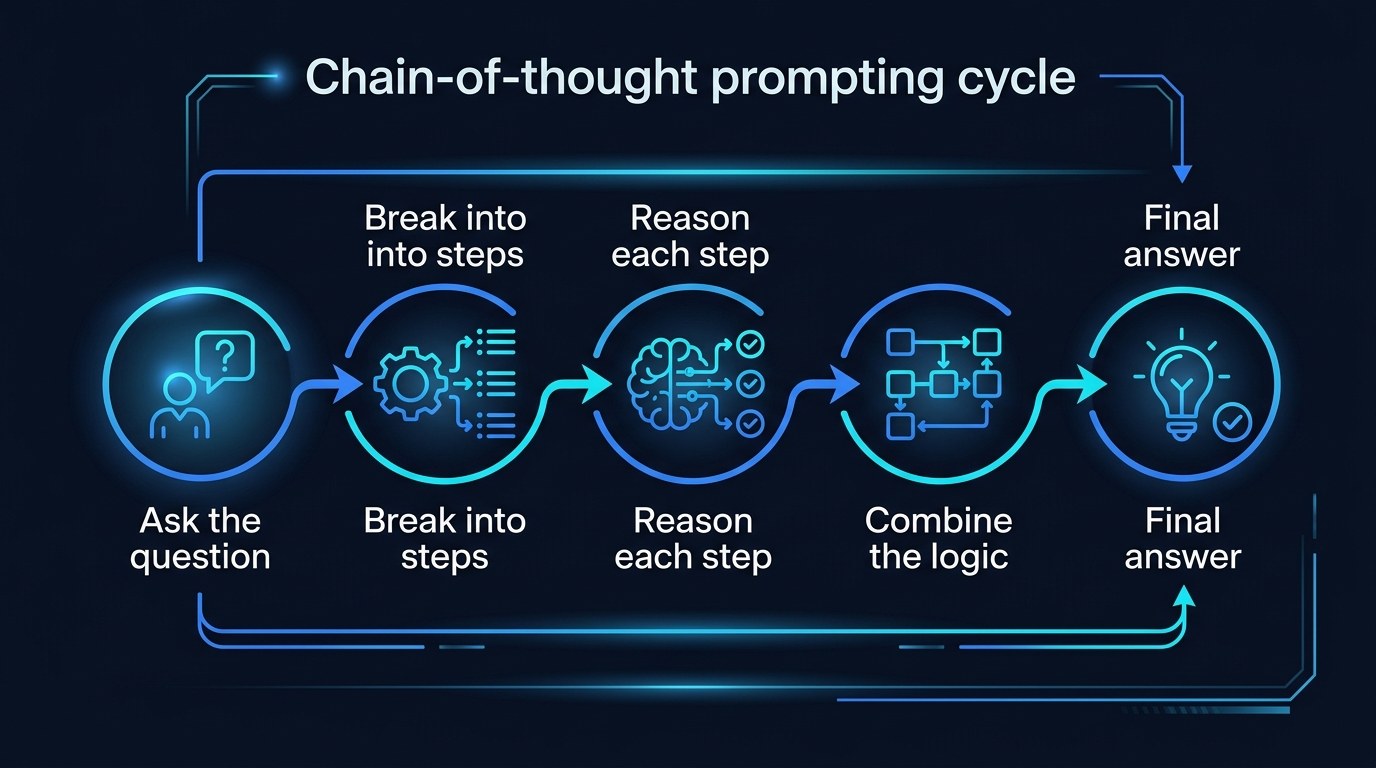
Chain-of-thought (CoT) prompting is the practice of asking an AI model to break a problem into intermediate steps and reason through each one before giving a final answer. Instead of "What should I charge?" you ask it to lay out costs, margins, and market rate first, then conclude. The technique was first documented in a 2022 research paper from Google, and by 2026 it's baked into how the strongest reasoning models work — but you still get far better results when you ask for it explicitly on everyday tasks.
The reason it works is simple: language models predict text one piece at a time. When the model writes out its reasoning, each step becomes context for the next, so it's effectively "thinking" on paper instead of guessing in one shot. Studies have repeatedly shown large accuracy jumps on multi-step math and logic problems when models are prompted to reason step by step rather than answer directly.
Why It Matters for Solopreneurs
You don't run a research lab, but your day is full of small multi-step problems: working out whether a discount still leaves you profitable, untangling a double-booked calendar, deciding which of three vendors fits your budget and timeline. Those are exactly the tasks where a one-shot answer goes wrong.
- Multi-step math — pricing, margins, tax set-asides, and proposal estimates where one skipped step ruins the result.
- Decisions with constraints — choosing between options when budget, time, and quality all pull against each other.
- Logic and sequencing — figuring out the order to do things in, or whether a plan even holds together.
- Auditable reasoning — work you'll act on with real money, where you need to check the "why," not just trust the "what."
When the AI shows its steps, you can catch the one bad assumption instead of discovering it after you've already sent the quote.
A Notable Shift in 2026
The big change is that reasoning is no longer a niche trick. Most leading models in 2026 ship a "thinking" mode that does chain-of-thought automatically and hides the steps by default. That's convenient, but it has a catch: when the reasoning is hidden, you can't audit it. For any task where you'll act on the answer, explicitly asking the model to show its steps — or to double-check its own logic — remains the single highest-leverage prompting habit a solopreneur can build.
The practical payoff is control. You stop treating AI as a vending machine that spits out answers and start treating it as a junior analyst who shows their work — one you can correct, redirect, and trust a little more each time.
How to Choose the Right Prompting Approach for Your Task
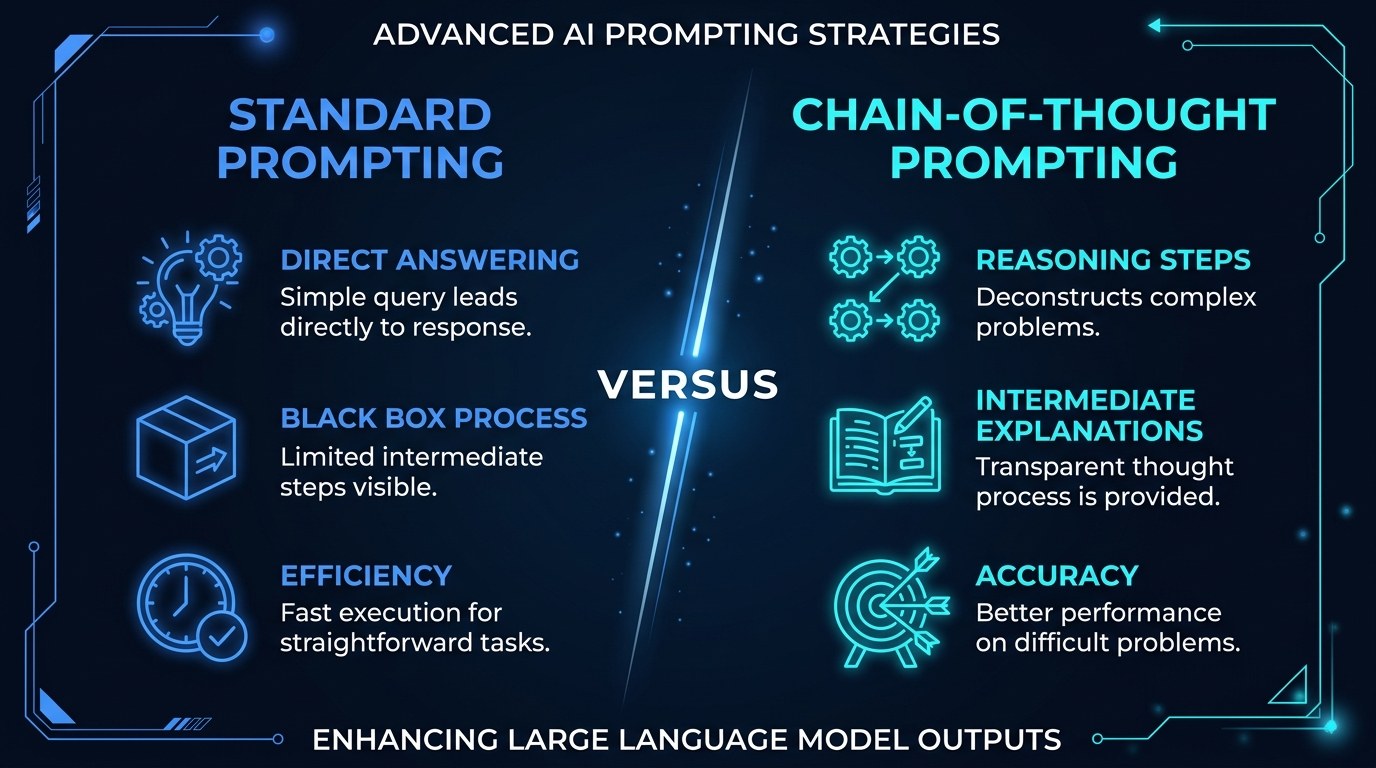
Not every task needs chain-of-thought. Asking for steps on a simple lookup just adds noise and cost. Use this table to match the approach to the job.
| Approach | Key Quality | Strengths | Best For | |---|---|---|---| | Direct prompt | Fast, cheap | Instant answers, minimal tokens | Lookups, rewrites, simple drafts | | Zero-shot CoT ("think step by step") | Low effort, big gains | Triggers reasoning with one phrase | Pricing math, quick decisions | | Worked-example CoT | Most reliable | Shows the model your exact method | Repeating a calculation your way | | Self-check CoT | Catches errors | Model reviews its own logic | Anything you'll act on with money | | Hidden reasoning mode | Effortless | Strong default reasoning | Exploratory thinking, brainstorming |
The single best habit for most solopreneurs is zero-shot chain-of-thought: just add "Think through this step by step before giving your answer" to any prompt that involves more than one calculation or constraint. It costs you eight words and routinely turns a wrong answer into a right one, because it forces the model to expose the middle steps where mistakes hide.
"Won't This Just Make Answers Longer?" — Practical Tips
Yes, and that's the point on hard tasks — but you control how much you see. Use these to keep it tight:
- Add "Show your reasoning, then give the final answer on its own line, labeled ANSWER." You get the steps and a clean takeaway.
- For routine work, ask the model to "reason silently, then give only the final answer" — you get the accuracy without the wall of text, on models that support it.
- Cap the depth: "Use no more than 5 steps." This stops over-thinking on a 2-step problem.
- When you only need to verify, paste your own work and ask "Check this step by step and flag any error" — that's 30 seconds and often catches a costly slip. For more reusable patterns like this, see our guide to building an AI prompt library.
Zero-Shot vs. Worked-Example CoT — Understanding the Difference
Zero-shot chain-of-thought just tells the model to reason step by step with no example. It's fast and works surprisingly well for general problems. Worked-example CoT means you first show the model one fully solved example — the problem, the steps, and the answer — then give it the real task. It's more work to set up, but it locks the model into your exact method.
The choice comes down to consistency. If you're solving a one-off problem, zero-shot is plenty. If you run the same calculation every week — say, a standard project estimate — a worked example makes the model copy your approach every time, so the format and logic stay identical no matter when you ask.
Chain-of-Thought for Every Stage of Your Business
The technique scales with how much is riding on the answer.
- Just starting out — Use zero-shot CoT to sanity-check pricing and basic budgeting before you commit numbers to a proposal. It's free insurance against math you'd otherwise eyeball.
- Growing and busy — Lean on self-check CoT for decisions you make under time pressure, like which lead to prioritize or whether to take on a rush job at a discount.
- Systemizing — Turn your best worked examples into saved prompt templates so every recurring calculation runs the same way, even when you hand it off later.
Beginner vs. Advanced Options
You can go as light or as deep as the task deserves:
- Beginner — Add "think step by step" to prompts in any free AI chat tool. No setup, no cost, immediate improvement on multi-step questions. Right for anyone who's never deliberately structured a prompt.
- Intermediate — Build reusable prompts that ask for reasoning plus a labeled final answer, and start using self-check prompts on financial decisions. The upgrade here is repeatability and fewer silent errors.
- Advanced — Use worked-example prompts and a saved library of reasoning templates, paired with a thinking-mode model for the hardest analysis. Worth it once the same problems recur often enough that consistency saves real hours.
Customization and Workflow Integration
In 2026, the smartest move isn't memorizing prompts — it's adapting reasoning to how you actually work.
- Save your three or four most-used CoT prompts where you can paste them in seconds.
- Tailor the step count and output format to each task type so analysis stays scannable.
- Add a standing "flag any assumption you're unsure about" line to surface the weak link in the model's logic.
Why This Matters for Solopreneurs Running Lean in 2026
If you've ever hesitated to trust AI with anything involving numbers or judgment, that instinct is healthy — and chain-of-thought is the answer to it. You don't have to choose between speed and being right. You just have to make the model show its work so you can check the one part that matters.
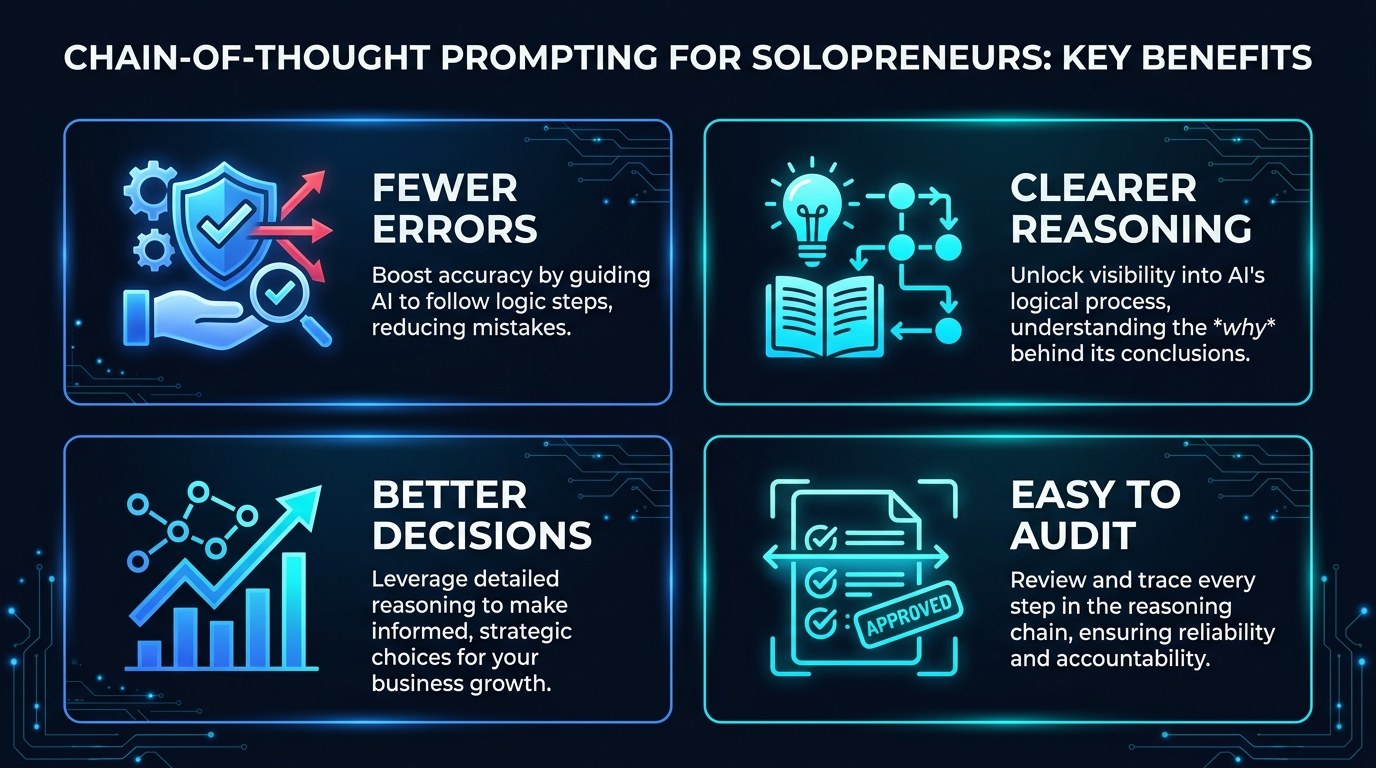
- Fewer expensive mistakes — catching a bad assumption before it lands in a quote or invoice.
- Clearer reasoning you can follow — so you learn the logic, not just copy the output.
- Better decisions under pressure — structured thinking even when you're moving fast.
- Auditable answers — a paper trail you can verify instead of blind trust.
Getting the Most Out of Chain-of-Thought Prompting
- Default to "think step by step" on any task with more than one calculation or constraint — it's the highest-return eight words in prompting.
- Always ask for a labeled final answer so you don't have to hunt through the reasoning.
- For money decisions, run a second pass: "Now check your own work and flag any error." Models catch their own slips more often than you'd expect.
- When an answer looks wrong, don't re-ask — paste the reasoning back and say "Step 3 looks off, recheck it." You fix the link instead of rerolling the dice. For deeper structure, pair this with our prompt frameworks guide.
Frequently Asked Questions About Chain-of-Thought Prompting
How do I actually trigger chain-of-thought prompting?
Add a short instruction to your prompt like "Think through this step by step before answering" or "Show your reasoning, then give the final answer." That's it — no special tools or settings needed. The phrasing tells the model to expose its intermediate steps instead of jumping to a conclusion.
What should I do if the reasoning looks wrong?
Don't just re-run the prompt and hope. Instead, walk it back step by step:
- Read the steps and find the first one that's off.
- Tell the model exactly which step looks wrong and why.
- Ask it to redo from that step forward, keeping the rest.
- Confirm the corrected final answer before you act on it.
Can I use chain-of-thought for non-math tasks?
Yes. It helps with any task that has structure — comparing options, planning a sequence, troubleshooting why something isn't working, or pressure-testing a decision. The catch is that for purely creative work, like brainstorming names, forcing rigid steps can flatten the output, so use a lighter touch there.
Conclusion
Chain-of-thought prompting isn't a hack or a trend — it's the difference between AI that guesses and AI that reasons. For a solopreneur juggling pricing, scheduling, and a dozen small decisions a day, that shift turns a fast-but-risky tool into one you can genuinely rely on. The model already has the capability; you just have to ask it to slow down and show the work.
Start small: the next time you hand AI a problem with more than one moving part, add "think step by step" and watch the answer get better. And if you want a steady stream of practical AI moves like this one, start with the free AI Morning Brief at aiproductivitydaily.com/free-tools — a daily digest of what's moving in AI, filtered for solopreneurs.
One AI workflow, every weekday.
Tutorials, tool reviews, and automation playbooks for solopreneurs running on AI. Short, useful, and free. Unsubscribe anytime.
No pitch. No upsell. One quick AI workflow per weekday.